
Digital Resource Center
Your new digital banking experience.
Faster, simpler, and built around how you actually bank. Here's how to get started.
See It in Action
Manage Accounts
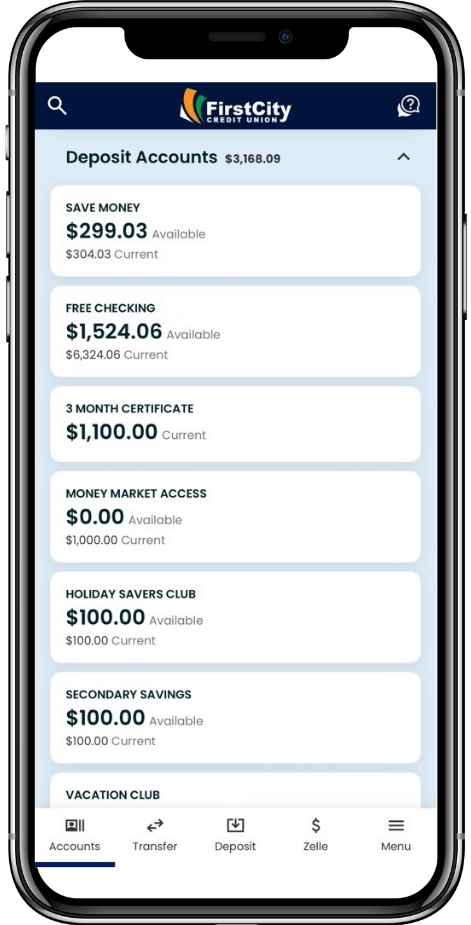
Easily manage all of your accounts in one place with one login.
Credit Monitoring
Get free credit score updates and analysis, monitoring and alerts, plus a full view of your credit report.
Mobile Deposit
Skip the trip to the branch and use your mobile device’s camera to deposit your next check.
Card Controls
Set daily limits, travel notifications, and block your card anytime through our Cards feature.
Account Alerts
Customize account and card alerts to be notified whenever and however you prefer.
Zelle®
A fast, safe, and easy way to send money to friends, family and other people you trust, even if they bank somewhere different than you do.
Step-by-Step Videos
Frequently Asked Questions
We heard your feedback- we are upgrading our digital banking platform to deliver a modern and intuitive banking experience for you. This upgrade allows us to provide enhanced functionality, improved performance, and more ways for you to manage your finances.
No, depending on your device settings, your app will automatically be updated or will require an update through the App Store.
There will be a short service interruption during the scheduled update on October 20th. We will send communications in advance so you may plan accordingly.
No problem! This is easy to recover. Select "Forgot Username or Password?" on the login screen and follow the prompts to securely restore your credentials and get back into your account.
That's okay, you have a few other options. You can use the MICR number located along the bottom of your checks, or your debit/credit card number.
A few, and they're quick to check. For the best experience, we recommend:
Apple: iOS 15 or newer
Android: Android 13 or newer
Desktop: your web browser updated to its latest version
If your device is running an older version, a quick update is all it takes.
Yes. After your first login to the upgraded digital banking experience, you can enable Face ID on Apple devices or biometric sign-in on Android devices for faster, secure access in the future.
If you're already enrolled in our digital banking experience, simply sign in with your existing username and password. During your first login after the upgrade, you'll complete a quick identity verification process and be prompted to create a new password to help keep your account secure.
If you're registering for the digital banking experience for the first time, be prepared to provide information to verify your identity and complete your enrollment.
You don't have to! The first time you sign in after the upgrade, you can keep your current password or create a new one. Whichever you choose, your personal and financial information stays protected by our latest security enhancements.
For your security, we recommend that each signer use their own login credentials rather than sharing a username and password. With the upgraded digital banking experience, each signer can create a unique login and securely view all accounts on which they are an owner. Individual credentials help protect your privacy, enhance account security, and provide greater control over account access.
With the enhanced digital banking experience, each signer can now create and manage their own digital banking profile, making authorized user access no longer necessary. Beginning Tuesday, October 20, 2026, existing authorized user credentials will no longer be active. Anyone who needs access can register and create their own login credentials at any time.
With our new digital banking experience, you will have access to new financial management tools, credit monitoring, and card management tools.
Yes. Your saved BillPay payees and scheduled recurring transfers will transfer over.
In the App: Tap 'Menu' -> Select 'Documents & Statements'. On Desktop: Click the 'Documents & Statements' tab from the main dashboard.
Go to 'Make a Transfer' -> Select Add an External Account' -> Complete the Instant Account Verification process to link your external bank account immedietly. Alternative option available to input your external banks routing and account number to verify using micro trial deposits.
Your alerts will not transfer over and can be easily setup. You can find this feature in your dashboard menu under "Account Alerts". You'll have additional customization capabilities and more ways to stay informed once this setup is complete.
Protecting your personal and financial information is our top priority. As part of this upgrade, we're introducing enhanced security features and additional protections designed to help safeguard your account and defend against evolving threats. These improvements provide a more secure digital banking experience while helping keep your information safe and protected.
Log into the app -> Select your desired share -> Click 'View Details' to view your full account/MICR number and routing number.
No. Your account numbers, member numbers, and our routing number remain exactly the same. Your existing physical checks will continue to work perfectly.
Your payees, scheduled payments, and payment history will transfer automatically and remain available after the upgrade. No action is required, and your existing payment information will not be affected.
Zelle® will be briefly unavailable during the early morning hours of Tuesday, October 20, 2026 as we complete the upgrade. We appreciate your patience and apologize for any inconvenience.
Your saved external accounts, scheduled payments, and member-to-member transfers will remain available after the upgrade and will not be impacted.
Zelle® will be back up as soon as the upgrade is complete on Tuesday, October 20, 2026.
Your Zelle® enrollment won't carry over, but setting it up again takes just a moment. The first time you access Zelle® after the upgrade, you'll be prompted to re-enroll and confirm the email address or mobile number you'd like to use.
Please double-check that the information you entered during login or registration matches exactly what's requested - a small typo is sometimes the cause. If you're still unable to access your account, we're here to help. Visit any First City branch or contact us at 800.944.2200 and we'll be glad to assist.
During your first login after the upgrade, you'll be guided through a verification process that includes a chance to review and update your contact information. If anything still looks off afterward, visit any First City branch or contact us at 800.944.2200 and we'll be happy to take care of it for you.
If you don't see an expected scheduled transfer or payment, first check any additional memberships you may have. Select the Profile icon and use the membership dropdown to switch between your memberships, then review the scheduled activity for each one.
If you still can't locate the transfer or payment, don't worry. You can easily set up a new transfer or reschedule a payment at any time through the Transfers menu. If you need assistance, we're happy to help - just give us a call at 800.944.2200.
Phone Support: Call our member support center at 800.944.2200 Ext 2453.
In-Person: Visit any of branch locations.
Email: Send us an email at [email protected].